Algorithms
Line strafing
Line strafing refers to the act of strafing along a fixed line towards a particular direction. It is not possible to strafe so that the path is a straight line, therefore we have to choose the strafing directions (either left or right) carefully to approximate a straight path and minimise the deviation from the path. We will describe the approach used by TasTools mod here.
Recall that every line in
To line strafe, we would use Equation (6.4) to compute two different player positions corresponding to left and right strafe. Then the distances of these positions from the line is compared, the direction that causes the smallest deviation from the line is chosen to be the final strafing direction for this particular frame.
The advantage of this method is that it allows some control over the amplitude of line strafe. If the initial player position is relatively far away from the line, then the amplitude of the subsequent path will be approximately equal to the initial point-to-line distance.
In practice, the method to compute tas_yaw while +linestrafe is active.
Computing strafing inputs
Up to this point we have been analysing strafing in terms of +moveright) correctly. In this section we describe a simple algorithm to
produce such input.
We start off by computing the intended +forward, +moveleft,
+moveright, +back). Assume that PM_CheckParamters is called. In principle it does not matter which of the
four commands are issued, but to minimise screen jittering we can adopt the
following guideline:
If
0 ≤ 𝜃 < 2 2 . 5 +backwith negativecl_backspeed.If
2 2 . 5 ≤ 𝜃 < 6 7 . 5 +backand+move(right|left)with negativecl_backspeed.If
6 7 . 5 ≤ 𝜃 +move(right|left).
where 22.5 is midway between 0 and 45, and 67.5 is midway between 45 and 90.
You must be wondering about the +back and negative cl_backspeed as
well. The rationale is this: we want to avoid accidentally pushing movable
entities. If you look at the CPushable::Move function in
dlls/func_break.cpp, notice that an object can be pushed only if
+forward or +use is active.
To compute the new yaw angle, in the most general way we compute
Notice the atan2 function is available in most sensible
programming languages. Do not use the plain arc tangent to compute
Now we can compute the following trial new yaw angles, denoted as
We see a new function anglemod and a new constant pm_shared/pm_math.c to wrap angles to
fmod. The spirit is not dissimilar to the famous fast inverse square
root approximation. The angles produced by anglemod is always a multiple of
The anglemod function truncates the input angle, instead of rounding it. The
following optimisation can be done to improve the accuracy slightly. Set
Autoactions
An autoaction refers to a set of input that are generated automatically when
certain conditions are met. In TasTools they are (in order of precedence)
tas_jb, tas_lgagst, tas_db4l, tas_db4c, tas_dtap,
tas_dwj and tas_cjmp. The tables below show the conditions and
corresponding actions. If a condition is not displayed, no-op is assumed.
Key: og is onground status, d is user +duck input, j is user
+jump input, and dst is duckstate. The abbreviation “a.u.” stands for
“after unducking”, while “a.d.” stands for “after ducking”.
When we say a command is taken precedence over the other, it means if the former command performs an action all lower precedence commands will be inhibited.
Implementing automatic jumpbug can be tricky. Suppose +duck is not active,
player is not onground and falling. We want to make sure the player is not
onground after the final groundcheck, which requires predicting the new
position after PM_AddCorrectGravity and movement physics. The following is
the action table for jumpbug implementation. Jumpbug is usually prioritised
over other autoactions. If
If dst 2 AND unduckable AND jumpable AND onground with dst 0, stop with
-duckand+jump.If new position is unduckable AND new position is onground with dst 0, stop with
+duckand-jump.
Automatic ducktap is taken priority over automatic jump unless stated otherwise. Recall that ducktapping only works if there exists sufficient space to accomodate the player bounding box if he is moved vertically up by 18 units, while the duckstate is not 2. If the duckstate is 2 then the player must first unduck for this frame. Ducktap is relatively complex:
og |
d |
j |
dst |
action |
|---|---|---|---|---|
0 |
0 |
1 |
2 |
|
1 |
– |
– |
0 |
|
1 |
– |
– |
1 |
|
1 |
– |
– |
2 |
|
For automatic jumping, the need to handle pmove->oldbuttons complicates
matters. At the time of writing, TasTools assumes IN_JUMP is unset in
pmove->oldbuttons. A rare use case for this would be to temporarily
disable automatic jumping simply by issuing +jump.
og |
d |
j |
dst |
action |
|---|---|---|---|---|
0 |
0 |
1 |
0 |
|
0 |
1 |
1 |
2 |
|
0 |
0 |
– |
2 |
Decrement and |
0 |
1 |
1 |
0 |
|
1 |
0 |
– |
1 |
Decrement and |
1 |
1 |
– |
1 |
Decrement and |
1 |
– |
– |
0/2 |
Decrement and |
Next we have DB4L. As with jumpbug, if
og |
dst |
action |
|---|---|---|
1 |
2 |
Decrement and set state to 0 if state is 1 |
0 |
0 |
|
0 |
2 |
|
Then we have DB4C.
og |
d |
dst |
action |
|---|---|---|---|
0 |
0 |
0 |
Decrement and |
We also have DWJ, which is inserting +duck at the instant the player jumps.
This can be useful for longjump and as a jumping style itself. To selfgauss
with headshot immediately after jumping usually requires this jumping style to
work. There is no action table for this – the counter is decremented and
+duck is inserted whenever the player successfully jumps.
Vectorial compensation
Vectorial compensation (VC) is a novel technique developed to push the strafing
accuracy closer to perfection by further compensating the effects of anglemod.
It is called vectorial as it manipulates the values for cl_forwardspeed
and cl_sidespeed, thereby changing the direction of
The idea is the following: while the yaw angle in degrees is always a multiple
of cl_forwardspeed and
cl_sidespeed in combination with cl_yawspeed so that the polar angle of
Have a look at the illustration below.
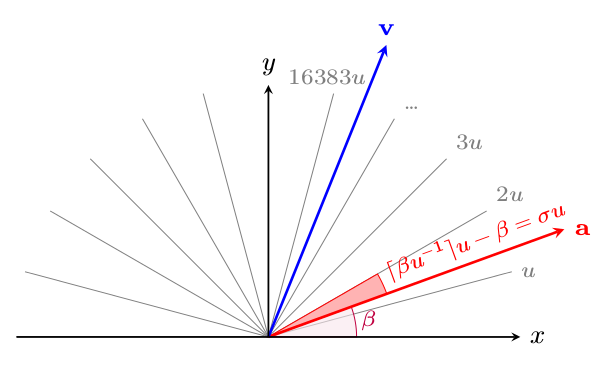
The
The algorithm would begin with the decision to strafe left or right, then
compute
where the
Now we must find
TODO
Delicious recipes
We will provide some implementations of basic strafing functions in Python.
import math is required.
The following function returns speed after one frame of optimal strafing.
def fme_spd_opt(spd, L, tauMA):
    tmp = L - tauMA
    if tmp < 0:
        return math.sqrt(spd * spd + L * L)
    if tmp < spd:
        return math.sqrt(spd * spd + tauMA * (L + tmp))
    return spd + tauMA
If computing the velocity vector is required, instead of just the speed, then
one might use the following implementation, where d is the direction: 1
for right and -1 for left.
def fme_vel_opt(v, d, L, tauMA):
    tmp = L - tauMA
    spd = math.hypot(v[0], v[1])
    ax = 0
    ay = 0
    if tmp < 0:
        ax = L * v[1] * d / spd
        ay = -L * v[0] * d / spd
    elif tmp < spd:
        ct = tmp / spd
        st = d * math.sqrt(1 - ct * ct)
        ax = tauMA * (v[0] * ct + v[1] * st) / spd
        ay = tauMA * (-v[0] * st + v[1] * ct) / spd
    else:
        ax = tauMA * v[0] / spd
        ay = tauMA * v[1] / spd
    v[0] += ax
    v[1] += ay
On the other hand, if we want to compute the velocity as a result of an
arbitrary
def fme_vel_gen(v, theta, L, tauMA):
    spd = math.hypot(v[0], v[1])
    ct = math.cos(theta)
    mu = L - spd * ct
    if mu < 0:
        return
    if tauMA < mu:
        mu = tauMA
    st = math.sin(theta)
    ax = mu * (v[0] * ct + v[1] * st) / spd
    ay = mu * (-v[0] * st + v[1] * ct) / spd
    v[0] += ax
    v[1] += ay
Note that these two implementations will no work if the speed is zero. This is a feature and not a bug: when the speed is zero the direction is undefined. In other words, the meaning of “rightstrafe” or “leftstrafe” will be lost without specifying additional information.
For backpedalling, we have
def fme_spd_back(spd, L, tauMA):
    return abs(spd - min(tauMA, L + spd))
Then we have the following function which applies friction. This function must be called before calling the speed functions when groundstrafing.
def apply_fric(spd, E, ktau):
    if spd > E:
        return spd * (1 - ktau)
    tmp = E * ktau
    if spd > tmp:
        return spd - tmp
    return 0