The player entity is special in Half-Life in that it can be controlled by inputs on the client side. Before we examine how we might exploit player movement for speedrunning purposes, we must first understand the “control surface” available to us. We must also understand some of the important states associated with the player.
All player movements can be controlled through commands. For instance, in the default game setup, pressing down the “W” key usually results in the +forward command being issued. Releasing the same key will cause -forward to be issued. This is because the “W” key is bound to the +forward command with the bind command, usually issued from config.cfg. Though, the -forward command need not be explicitly bound.
There are many similar commands available. It is beyond the scope of this documentation to provide a detailed description for all commands and indeed all cvars. The reader is invited to generate a list of all commands with the cmdlist command and study the SDK code for each of them, for example, in the cl_dlls/input.cpp file in the Half-Life SDK. Many of the commands are also self-explanatory or intuitive in their operations. For example, +attack2 simply fires the secondary attack if a weapon is available. For speedrunning purposes, we will focus on the movement and the viewangles commands and cvars.
The term viewangles is commonly used to refer to viewing direction of the “camera” associated with the player entity. This is not a purely client side state: the “source of truth” is maintained on the server side, which is replicated to the client side for graphics rendering.
Definition 3.1 (Viewangles)
The viewangles is the triplet (𝜑,𝜗,𝜚)∈ℝ3 which respectively denotes the pitch, yaw, and roll angles.
As we will see in Anglemod, the actual viewangles values stored on the server side are truncated and clamped into a multiple of 360/65536. Hence, we may alternatively define the truncated viewangles as in Definition 3.2.
Definition 3.2 (Truncated viewangles)
Define the set
V={36065536𝑘∣𝑘∈{0,1,2,…,65535}}.
The truncated viewangles are the triplet (𝜑,𝜗,𝜚)∈V3.
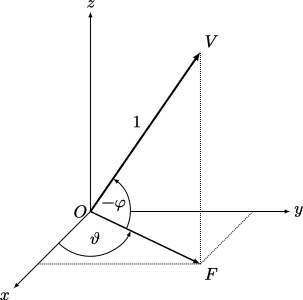
Note that the notations for the pitch, yaw, roll are different from 𝜃, 𝜙, and 𝜌. In mathematical discussions, the viewangles are assumed to be in radians unless stated otherwise. However, do keep in mind that they are stored in degrees in the game. The roll angle 𝜚 is rarely used or involved in player physics, and it is almost always zero. With only the pitch and yaw to worry about, we may illustrate how they correspond to the camera viewing angle by Fig. 3.1..
Fig. 3.1. Illustration of the geometric meaning of 𝜑 and 𝜗, with the camera’s view represented by OV. Note that OF is the projection of OV on the horizontal plane. Note also that since the sign convention of in-game 𝜑 differs from that of standard trigonometry, a negative sign is needed to represent “looking up”.
One way to control the pitch and yaw is by moving the mouse. This is far too imprecise for tool-assisted speedrunning, however. A better method for precise control of the angles is by issuing the commands +left, +right, +up, or +down. When one or more of these commands are active, the game increments or decrements the pitch or yaw by a certain amount per frame. The amount can in turn be controlled by adjusting the cvars cl_yawspeed and cl_pitchspeed. The roll angle can’t be directly controlled by player inputs.
Definition 3.3 (Pitch and yaw controls)
Assume 𝜑 and 𝜗 are in degrees. For all frame 𝑘∈ℤ, the player pitch and yaw angles are modified in order as follows.
Although the viewangles commands were originally intended to allow moving the camera slowly by arrow keys, in a TAS they are the primary means to precisely pinpointing the pitch and yaw angles to the desired value instantaneously at the beginning of a frame before all the game physics are run. For example, suppose in frame 𝑘 we have 𝜏𝑔=0.001, KS(down,𝑘)=1, and 𝜑=0. If we wish to set 𝜑=9⋅360/65536 in frame 𝑘+1, we may set the cvar cl_pitchspeed=9⋅(360/65536)/𝜏𝑔≈49.4. In practice, to avoid floating point rounding issues, we should target 9.5⋅360/65536 instead and calculate cl_pitchspeed accordingly, allow the 𝔄𝑑 function to truncate the 9.5⋅360/65536 down to 9⋅360/65536.
When the viewangles are sent to the server, their values in degrees are rounded slightly using the anglemod function, which will be denoted 𝔄. We’ll define the function precisely as follows.
Definition 3.4 (Integer truncation)
For all 𝑥∈ℝ, define int:ℝ→𝕀𝑛 the integer part or integer truncation function as
int(𝑥)={⌊𝑥⌋𝑥≥0⌈𝑥⌉𝑥<0,
where 𝕀𝑛⊂ℤ is an 𝑛-bit integer in two’s complement. We will assume in this documentation that 𝑛>16. We may also interpret this function as rounding 𝑥 towards zero.
Definition 3.5 (Degrees-anglemod)
The degrees-anglemod function 𝔄𝑑:ℝ→ℝ may be written as
𝔄𝑑(𝑥)=36065536(int(𝑥65536360)𝙰𝙽𝙳65535)
where AND is the bitwise AND binary operator.
Definition 3.6 (Radians-anglemod)
The radians-anglemod function 𝔄𝑟:ℝ→ℝ may be written as
𝔄𝑟(𝑥)=2𝜋65536(int(𝑥655362𝜋)𝙰𝙽𝙳65535).
To illustrate, we have the following examples of the output of degrees-anglemod.
𝑥
𝔄𝑑(𝑥)
𝑥mod360
0
0
0
1
0.99975586
1
20
19.995117
20
45
45
45
89
88.99475
89
400
39.995728
40
−0.005
0
359.995
−1
359.00024
359
−20
340.00488
340
−45
315
315
−400
320.00427
320
The philosophy behind the anglemod function is to “wrap” the input angle into the range of [0∘,360∘) (for the degrees version). Except, rather than implementing the function in the most straightforward way using conditional branches and floating point divisions, the game approximates the result with a combination of integer bitwise operations and floating point multiplications, presumably to improve performance on 1990s hardware. On modern hardware, one could simply call the fmod standard library function in C. Incidentally, the CryEngine 1 also contains small uses of anglemod, though it’s not used for view computation.
Definition 3.7 (Real version of modulo)
A version of the modulo binary operator 𝑥mod𝑦 may be defined for 𝑥∈ℝ and 𝑦∈ℤ+ with 𝑦>0 such that 𝑥=𝑦𝑞+𝑟 where 𝑞∈ℤ and 𝑟∈ℝ with 0≤𝑟<𝑦.
Anglemod, then, is an approximation of 𝑥mod360 with 𝑥∈ℝ for the version in degrees.
Lemma 3.1 is useful for converting the bitwise AND operation into the mathematically more well understood and convenient mod operator. Since we assume the int operator produces 𝕀𝑛 where 𝑛>16, this lemma is applicable to the anglemod function as it computes an integer of more than 16 bits modulo 65536=216 with 𝑚=16. This will be useful in the subsequent proofs.
Lemma 3.1 (Equivalence of bitwise AND and modulo)
Let 𝑥 be an 𝑛-bit integer in two’s complement and 𝑚<𝑛 an integer. Then 𝑥𝙰𝙽𝙳(2𝑚−1)=𝑥mod2𝑚=𝑟, such that 𝑥=2𝑚𝑞+𝑟 with 0≤𝑟<2𝑚.
Proof. Assume 𝑥≥0 with 𝑛 bits. We may write 𝑥=∑𝑛𝑘=0𝑏𝑘2𝑘. Then 𝑥𝙰𝙽𝙳(2𝑚−1)=∑𝑚−1𝑘=0𝑏𝑘2𝑘 as this is equivalent to “masking out” the least significant 𝑚 bits. Separately, note that 𝑥mod2𝑚 removes higher order terms ∑𝑛𝑘=𝑚𝑏𝑘2𝑘 because 2𝑚 divides the sum, hence 𝑥mod2𝑚=∑𝑚−1𝑘=0𝑏𝑘2𝑘=𝑥𝙰𝙽𝙳(2𝑚−1), as required.
Now assume 𝑥<0. Since 𝑥 is stored in two’s complement, if we reinterpret the bits as an unsigned integer, we obtain ˜𝑥=2𝑛+𝑥>0. Now since 𝑚<𝑛, we have
Suppose 𝑥≥0. By inspection and Lemma 3.2, we only need to consider 0≤𝑥<360, as any 𝑥≥360 can be reduced to these bounds by subtracting a multiple of 360. This allows us to simplify and write 𝑓=𝑥−𝔄𝑑(𝑥). By Definition 3.4, we can also replace the integer truncation function int with the simpler floor function ⌊⋅⌋ in 𝔄𝑑. Now
where we have set 𝑦=𝑥⋅65536/360. The assumption 0≤𝑥<360 implies 0≤⌊𝑦⌋<65536 and ⌊𝑦⌋mod65536=⌊𝑦⌋, so
0≤𝑓=36065536(𝑦−⌊𝑦⌋)<36065536.
Suppose −360/65536<𝑥<0. Observe that 𝔄𝑑(𝑥)=0 but 𝑥mod360=360−𝑥. So 360−(𝑥mod360)=𝑥, as required.
Finally, suppose −360<𝑥≤−360/65536. Again with Lemma 3.2, any 𝑥≤−360 can be reduced to these bounds or the case above by adding a multiple of 360. So 𝑓=360+𝑥−𝔄𝑑(𝑥). We can replace the int function with ⌈⋅⌉ in 𝔄𝑑 by Definition 3.4. So similarly,
As stated by Theorem 3.1, anglemod introduces a loss of precision in setting angles. This can result in a loss of optimality in strafing. There are two ways to reduce the effects of anglemod, namely by the simple anglemod compensation and the more advanced vectorial compensation. These techniques will be described in Vectorial compensation.
In Viewangles we parametrised the player’s viewing direction in terms of the viewangles (𝜑,𝜗,𝜚). In many game mechanics, we work with vectors associated with the viewing direction instead. We may call them view vectors.
Definition 3.8 (Three dimensional view vectors)
Let 𝜑 and 𝜗 be the pitch and yaw angles in radians as defined in Definition 3.1. Assume that 𝜚=0. The three dimensional view vectors ˆ𝐟,ˆ𝐬∈ℝ3 are defined as
with ‖ˆ𝐟‖=‖ˆ𝐬‖=1. We may refer to ˆ𝐟 as the (unit) forward vector, and ˆ𝐬 as the (unit) right vector.
Lemma 3.3
The unit right vector ˆ𝐬 and the unit forward vector ˆ𝐟 are perpendicular with each other. If −𝜋/2<𝜑<𝜋/2, the unit right vector points to the right of the unit forward vector when viewed from the top.
Proof. We have
ˆ𝐟⋅ˆ𝐬=cos𝜗cos𝜑sin𝜗−sin𝜗cos𝜑cos𝜗=0
as required. In addition, compute
ˆ𝐬׈𝐟=⟨cos𝜗sin𝜑,sin𝜗sin𝜑,cos𝜑⟩.
When −𝜋/2<𝜑<𝜋/2, we have 0<cos𝜑. This implies the cross product always points up with a positive 𝑧 coordinate. This implies ˆ𝐬 is perpendicularly to the right of ˆ𝐟.
Note that the negative sign for 𝑓𝑧 is an idiosyncrasy of the GoldSrc engine inherited from Quake. This is the consequence of the fact that looking up gives negative pitch angles and looking down gives positive pitch angles.
We sometimes restrict our discussions to the horizontal plane, especially when discussing the air and ground player movement physics (see Air and ground movements). In this case we assume 𝜑=0 and define the two dimensional view vectors.
Definition 3.9 (Two dimensional view vectors)
The two dimensional view vectors may be defined by restricting 𝜑=0 and invoking Definition 3.8 as follows:
ˆ𝐟=⟨cos𝜗,sin𝜗⟩ˆ𝐬=⟨sin𝜗,−cos𝜗⟩.
Provided the original vector is not vertical, the two dimensional unit forward vector may equivalently be obtained by projecting the three dimensional ˆ𝐟 vector onto the 𝑥𝑦 plane, then normalising the result. The two dimensional unit side vector is simply a rotation of the forward vector by 90 degrees to the right. This is, in fact, how the game actually calculates the two dimensional view vectors in player movement physics. It is therefore very important that the pitch does not go vertically up or down, causing sin𝜑=±1 or gimbal lock.
Note that Definition 3.8 and Definition 3.9 are not valid if the roll angle 𝜚≠0. Nevertheless, the roll is very rarely nonzero in practice, and so it rarely affects the physics described in this document.
The punchangles can refer to the client side or the server side values. The client side punchangles are usually affected by weapon recoil and are cosmetic in nature. Namely, they do not affect the aiming viewangles of the player. The player may be aiming with zero pitch while the camera appears to point elsewhere, but the actual view vectors and server side physics calculations are not affected by the cosmetic punchangles. The server side punchangles, on the other hand, affects the viewangles and therefore the aiming. The server side punchangles are affected by certain types of damage (see Health and damage) and attacks from monsters.
The punchangles may be denoted as 𝐏, consisting of punch pitch, punch yaw, and punch roll. When the punchangles are nonzero, the game will smoothly decrease the angles until all of them become zero.
Definition 3.10 (Punchangles update equation)
Let 𝐏∈ℝ3 be the punchangles. In every frame, the game updates the player punchangles by setting
The punchangles are rarely a matter of concern, except when the punch yaw and punch roll are nonzero, because they can affect strafing (Strafing). Nevertheless, this rarely occurs when speedrunning in practice, and even if they do occur, the impact on strafing efficiency is globally minimal.
Interestingly, when a save is performed then restoring from the save, the punchangles will be added to the viewangles (𝜑,𝜗,𝜚) themselves and the punchangles will be set to zero. When this happens, the player pitch and yaw will not decrease gradually as is the case when punchangles are nonzero, though the roll angle still does.
Theorem 3.2
Suppose the initial punchangles 𝑃0 is set by some game mechanics and then left to decay. Then the punchangles update equation can be written in closed form to give the punchangles at frame 𝑛∈ℤ as
𝐏𝑛=‖𝐏𝑛‖‖𝐏0‖𝐏0,
where
‖𝐏𝑛‖=max((20+‖𝐏0‖)(1−12𝜏𝑝)𝑛−20,0).
We may also substitute 𝑛=𝑡/𝜏𝑝 to obtain an equation in terms of game time 𝑡∈ℝ.
When the WASD movement keys are held, the game computes three values: 𝐹, 𝑆, and 𝑈. These values are called the forwardmove, sidemove, and upmove respectively, or FSU for short, and are critically important as inputs to the player movement physics (see Player movement basics). The computation of FSU relies on several cvars which we will soon see.
Definition 3.11 (sv_maxspeed)
Let 𝑀𝑚∈ℝ be the value of the cvar sv_maxspeed. In vanilla Half-Life, 𝑀𝑚=320.
Recall from DELTA rounding that the forwardmove, sidemove, and upmove values from the client are truncated to a 12-bit sign-magnitude representation before sending to the server. For notational convenience, we have Definition 3.12.
Definition 3.12 (DELTA truncation of FSU)
Let 𝑥∈ℝ. The DELTA truncation and clamping function for FSU, DeltaTrunc:ℝ→ℤ, is
DeltaTrunc(𝑥)=max(min(int(𝑥),2047),−2047).
We may then define FSU computationally or operationally as Definition 3.13.
Definition 3.13 (FSU)
Let ˜𝐹,˜𝑆,˜𝑈∈ℝ on the client side in some frame 𝑘∈ℤ. Let KS be the key state function defined in Definition 3.14. Then we compute the following in order.
Now if (˜𝐹,˜𝑆,˜𝑈)=(0,0,0), then (𝐹,𝑆,𝑈)=(0,0,0) and we are done. Otherwise, let
𝜌=min⎛⎜
⎜⎝𝑀𝑚∥⟨˜𝐹,˜𝑆,˜𝑈⟩∥,1⎞⎟
⎟⎠.
Then (𝐹,𝑆,𝑈)=(𝜌˜𝐹,𝜌˜𝑆,𝜌˜𝑈).
The reader may verify the computations in Definition 3.13 by examining the PPM_CheckParamters [sic] in the Half-Life SDK.
Theorem 3.3
Let ˜𝐹, ˜𝑆, ˜𝑈 be the values at the end of the computations in Definition 3.13. Then
‖⟨𝐹,𝑆,𝑈⟩‖=min(𝑀𝑚,∥⟨˜𝐹,˜𝑆,˜𝑈⟩∥).
Proof. If (˜𝐹,˜𝑆,˜𝑈)=(0,0,0) then we are done. Otherwise, note that ‖⟨𝐹,𝑆,𝑈⟩‖=𝜌∥⟨˜𝐹,˜𝑆,˜𝑈⟩∥. If 𝑀𝑚≥∥⟨˜𝐹,˜𝑆,˜𝑈⟩∥, then 𝜌=1 and we are done. Now suppose 𝑀𝑚<∥⟨˜𝐹,˜𝑆,˜𝑈⟩∥. Then
Generally speaking, pressing a movement key translates to accelerating the player towards a particular direction, and pressing the viewangles keys translates to yawing and pitching the player viewangles. Unfortunately, how much the player accelerates and how much the viewangles change depend on whether the key in question started being pressed or if the key has been pressed for more than one frame. We may capture this “multiplier” succinctly by means of the key state function.
Definition 3.14 (Key state)
Let Cmd be the set of movement and viewangles commands. For example, forward∈Cmd. Let
KS:Cmd×ℤ→{0,12,1}
be the key state function defined as follows. Suppose a key 𝐾 is first pressed on frame 0, continuously held for subsequent frames, then released on frame 𝑛. Then we may define operationally
KS(𝐾,𝑖)=⎧{
{⎨{
{⎩12𝑖=011≤𝑖<𝑛0𝑛≤𝑖.
The key state function is highly consequential for speedrunning, especially if we naively press and release the movement and viewangles keys rapidly. To see why, consider how 𝐹 as defined in Definition 3.13 is computed. Without loss of generality, assume only the +forward key is being pressed. Then at frame 𝑘∈ℤ, we have
In vanilla Half-Life, we have 𝑀𝑚=320 and cl_forwardspeed=400. In the first frame of pressing +forward, by definition KS(forward,0)=1/2, while in subsequent frames 𝑘≥1, KS(forward,𝑘)=1. Hence, ˜𝐹0=200, 𝐹0=200, and for 𝑘≥1, ˜𝐹𝑘=400 and 𝐹𝑘=320=𝑀𝑚. Since 𝐹 has a lower value in the first frame, the player will experience lower acceleration in the first frame (as we will see in Player movement basics and Strafing). As described in Line strafing, in a TAS we often strafe along a straight line path, which necessitates alternating between strafing left and right at most 1000 times per second. The most naive way to implement this is by alternating between pressing and releasing +moveright and +moveleft. However, this means each key is held for only 1 or 2 frames, so 𝑆 spends most of the time carrying the lower value. This results in drastically lower acceleration throughout the process. To mitigate this problem, a TAS tool might instead hold one of +moveright or +moveleft constantly for as long as the tool is active to ensure the key state stays at 1, while adjusting the values of cl_forwardspeed and cl_sidespeed directly on a frame by frame basis. Alternatively, a TAS tool could set the movement values sufficiently high to compensate for the halving due to the key state on the first frame of pressing a key.
The same problem also applies to adjusting the viewangles by the viewangles commands +left, +right, +up, and +down. Though the problem here can be mitigated similarly.